
Tags
book cover, cd cover, composition, Cover Art, Cover design, design, golden ratio, Keith Draws, kindle
This is a very simple template that can enhance your layout substantially.
It can be used on any format and it can also be broken down into further thirds sections, but more of that later. First lets look at the template when applied to a standard 6 x 9 book cover.
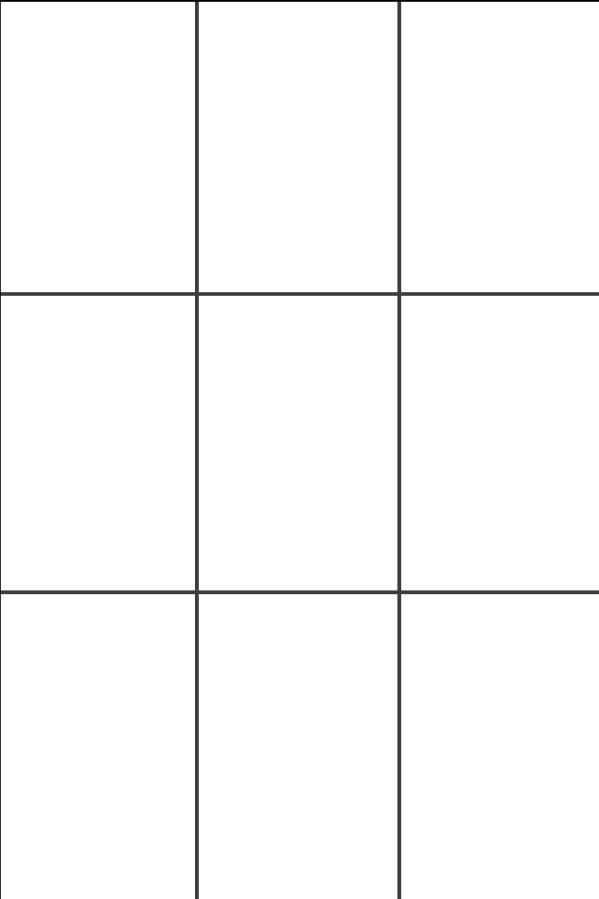
Standard 6×9 book, “thirds” grid.
The rule of thirds was first written down by John Thomas Smith in 1797. In his book Remarks on Rural Scenery, Smith quotes a 1783 work by Sir Joshua Reynolds, in which Reynolds discusses, in unquantified terms, the balance of dark and light in a painting. Smith then continues with an expansion on the idea, naming it the ‘Rule of thirds’:
Two distinct, equal lights, should never appear in the same picture: One should be principal, and the rest sub-ordinate, both in dimension and degree: Unequal parts and gradations lead the attention easily from part to part, while parts of equal appearance hold it awkwardly suspended, as if unable to determine which of those parts is to be considered as the subordinate. “And to give the utmost force and solidity to your work, some part of the picture should be as light, and some as dark as possible: These two extremes are then to be harmonized and reconciled to each other. (Reynolds’ Annot. On Du Fresnoy.)
Analogous to this “Rule of thirds”, (if I may be allowed so to call it) I have presumed to think that, in connecting or in breaking the various lines of a picture, it would likewise be a good rule to do it, in general, by a similar scheme of proportion; for example, in a design of landscape, to determine the sky at about two-thirds ; or else at about one-third, so that the material objects might occupy the other two : Again, two thirds of one element, (as of water) to one third of another element (as of land); and then both together to make but one third of the picture, of which the two other thirds should go for the sky and aerial perspectives. This rule would likewise apply in breaking a length of wall, or any other too great continuation of line that it may be found necessary to break by crossing or hiding it with some other object : In short, in applying this invention, generally speaking, or to any other case, whether of light, shade, form, or color, I have found the ratio of about two thirds to one third, or of one to two, a much better and more harmonizing proportion, than the precise formal half, the two-far-extending four fifths and, in short, than any other proportion whatever. I should think myself honored by the opinion of any gentleman on this point; but until I shall by better informed, shall conclude this general proportion of two and one to be the most pictoresque medium in all cases of breaking or otherwise qualifying straight lines and masses and groupes , as is agreed to be the most beautiful, (or, in other words, the most pictoresque) medium of curves
Source: http://en.wikipedia.org/wiki/Rule_of_thirds
Basically what he’s saying is only have one center of focus and everything else in the image should serve to complement it and guide the eye toward it. Using this grid should help an artist (you in this case) balance the image. I’ll talk about color and contrast in more detail in a later post.
That’s easily said, even using this grid to create a balanced and pleasing image is not always as easy as it sounds so its always worth experimenting with it.
I’ve created some simple layouts guides to help you in some small way, I recommend you experiment further:
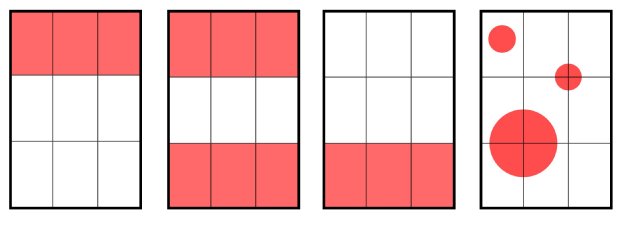
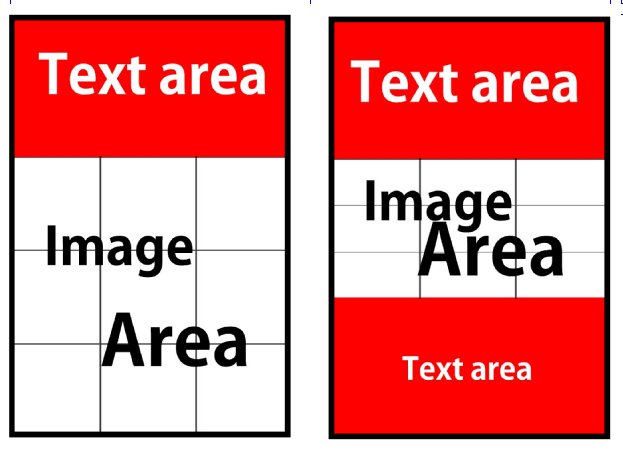
Remember earlier when I said: “ it can also be broken down into further thirds sections”
Here are a couple of examples of that:
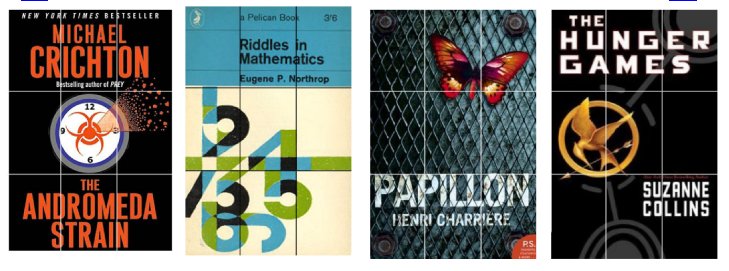
 And now here are a few examples of actual books with the rule of thirds applied on the cover:
The Golden Ratio Nine section gird
It’s also possible to adapt the Golden Ratio into a 9 section grid for your cover. You simply take four Golden rectangles and overlay them as shown below:
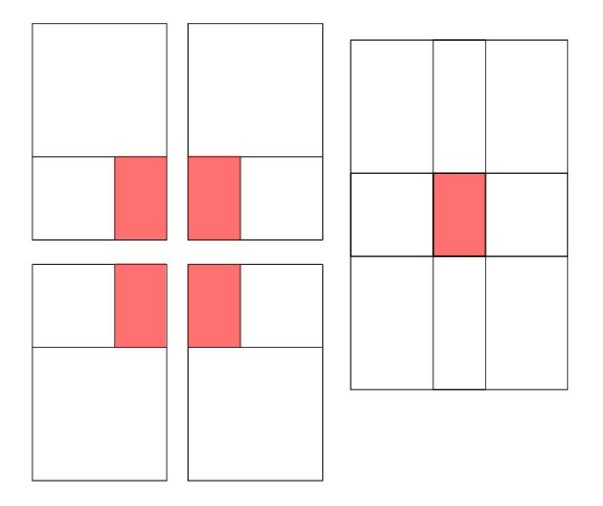 I actually prefer it to the standard “Rule of Thirds” and I’m working on a cover using this format right now, so I’ll post it as soon as its done showing you some of the design decisions I was faced with when I produced it. I’ll talk about color and contrast in more detail in a later post.
Finally, I’m giving you a photoshop template at the correct resolution for a 6 x 9 book including bleed with overlays for both of these grids. It’s 450 DPI at actual size and includes 3mm bleed. It also includes a template for the Kindle cover format which is 1.6 and slightly different to the 6×9 cover. Right-click the link to save and Download here:
Okay, I think that’s it for now, I hope this is helpful to you.
 keithdraws
Hi Keith,
I downloaded your template, and it looks great, but it’s not actually 6×9. It’s more like 4.75×6.9. Am I doing something wrong?
Hi Shane,
Its a resolution issue.
For some reason I saved the template at 600 dpi.
If you change the resolution to 450 dpi without re-sampling the image you will see the document is then 6.231 Inches x 9.231 inches. This is a 6 x 9 inch page with an eighth of an inch bleed all around (more accurately the bleed is 3mm which is industry standard)
Once the artwork is complete save out a copy and reduce the resolution to 300 dpi (which represents a reduction of about 67% because all image based artwork should be created at least half up for best printing results) with re-sampling. The artwork will then be at the correct size and resolution and will have the correct bleed for print.
Hope this helps.
Keith
Hi Keith,
I’m not sure what you mean by re-sampling. When I go to Image>Image Size and change the resolution from 600 to 450, the whole thing just gets smaller on the page but the dimensions in inches stay the same.
when you go to image>image size first uncheck resample image, which will uncheck the other two, Then change the dpi to 450 and the size will change to the correct size., Here is an image to demonstrate: https://keithdraws.com/kd/resolution.jpg
That’s awesome – worked perfectly. Thanks, Keith.
Glad I could help 😀
It’s an awesome post for all the online users; they will obtain advantage from it I am sure.
Thank you. That’s my intention. 😀
Hello Keith, any chance you could re-upload your template again? I’m aware this is an old article, but would be great if I could have a look!
Many thanks
I didn’t know the link was dead. I updated it now. Thanks for letting me know 🙂 Oh and don’t forget to change the resolution to 450 dpi ( first uncheck resample image).