Cover art for G. Wakeling’s “Cryo-A Changed World”

As a cover designer, how would you have approached this?
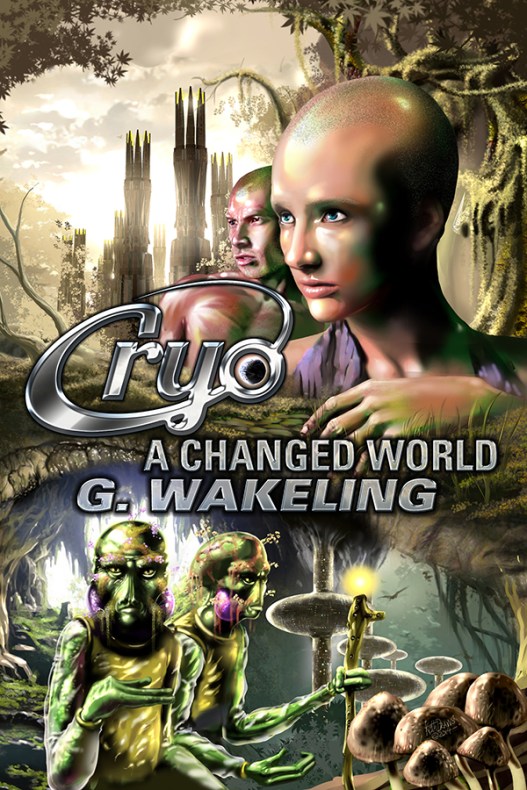
Cryo, A Changed World cover art © Keith Draws

Cryo, A Changed World cover art © Keith Draws

Geoff wanted to show an under ground and an overground world.

Its best to hint at what’s there without giving away too much.

Designing the amphibian underground dwellers was certainly challenging. The description Geoff supplied was :

– Amphibian-like with large eyes and a flattish nose.

– Shorter than humans, with longer arms in body proportion that have three fingers

– They adorn themselves with living plants/moss/fungi/lichen that’s embedded into their actual skin. So you might have a female with a silvery lichen growing up the side of her face, or swirling patterns of tiny flowers receding over her brow.

– No hair…they either have the adornments, or men wear flat cap-like hats. Females are taller than males and wear long headdresses to elongate their bodies.

I decided the title would sit well in the middle and then used golden ratios to help me with the unusual composition, using the landscape to create a sense of mystery and a desire to explore.

Read more about Geoff on his BlogFacebook page or on Google+ 

Prints and posters of this image available here
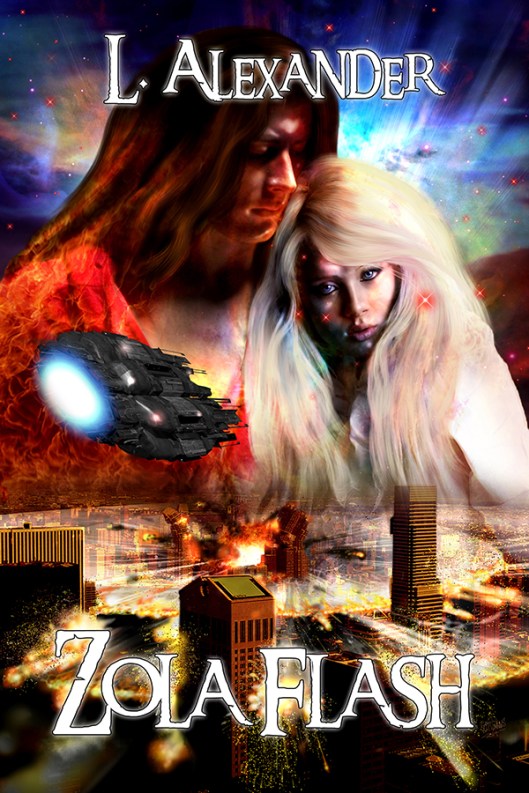
L. Alexander’s “Zola Flash”

The cover for L. Alexander’s “Zola Flash”

ZOLA flash cover art © Keith Draws

ZOLA flash cover art © Keith Draws

This is a mix of Photo manipulation and digital painting.

It was very challenging and fun to work on.
Cover stock photography used:
Figures: Marcus Ranum photographer, models: miss-mosh and Colin R
New York photography: http://fantasysangel-stock.deviantart.com/

The cover for John DeJordy’s “Traditions” Book three of the “Transfigurations” Series.

I’m really enjoying working on this series of covers for John.

Traditions cover art © Keith Draws

Traditions cover art © Keith Draws

He gives me wonderful subject matter to work with very strong ideas of what he would like to see.

At the same time giving me plenty of latitude to exercise my own creativity.

If you want to know more about Johns work his blog is here or you can follow him on Twitter.

There are two more books in the series and I’m looking forward to starting on those covers soon.

Buy the poster here

Breathtaking book cover

Just wow!breathtaking cover

Apparently my cover for “The Island” by Teri Hall is breathtaking.

See the actual post here

How not to design a cover.

8 Hilariously Misleading Covers Slapped on Classic Books
Read more

It’s $75 digitally illustrated cover time again! And more Thanksgiving specials:

This offer is now closed

For all your support this year I give thanks with some Great New Thanksgiving deals

Custom Digitally Painted Covers For E-Books:

For the basic custom E-Book cover Normal Price  $250
Special limited time offer

One cover only: $75 US

Three covers only $195 US

The prices all include free typographic design.

Size 1400px wide.
I will supply kindle format and  Any other format you request
Actual size Samples here.
Not suitable for printing. 

Check out the rest here


Introducing “Bill Me Later®”, by Paypal™

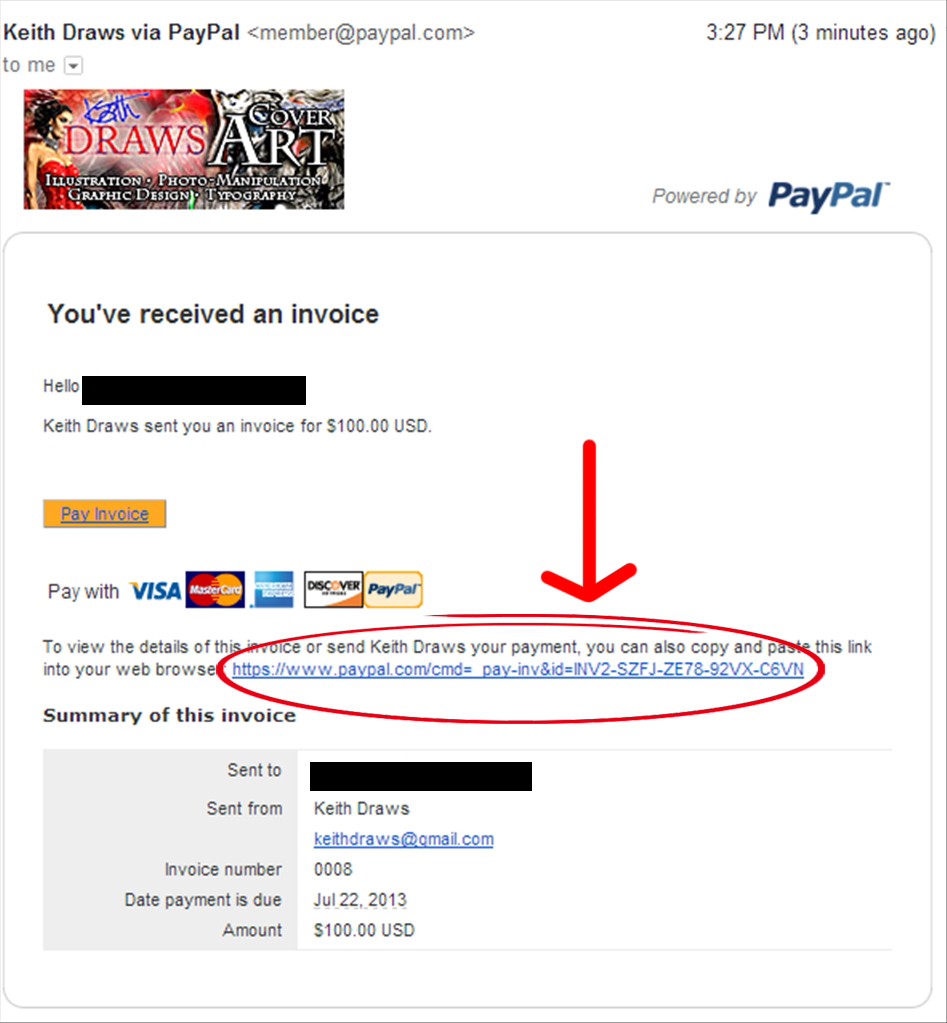
We are thrilled to announce we are now offering the “Bill Me later” service, powered by Paypal. By using this service, you can get up to 6 months interest-free finance for purchases of $99 or more. Signing up is very simple and only takes a few minutes:

1.- When you receive an invoice from us, click on the link provided. It will take you to a different page where you can see the invoice in full.

ScreenShot019

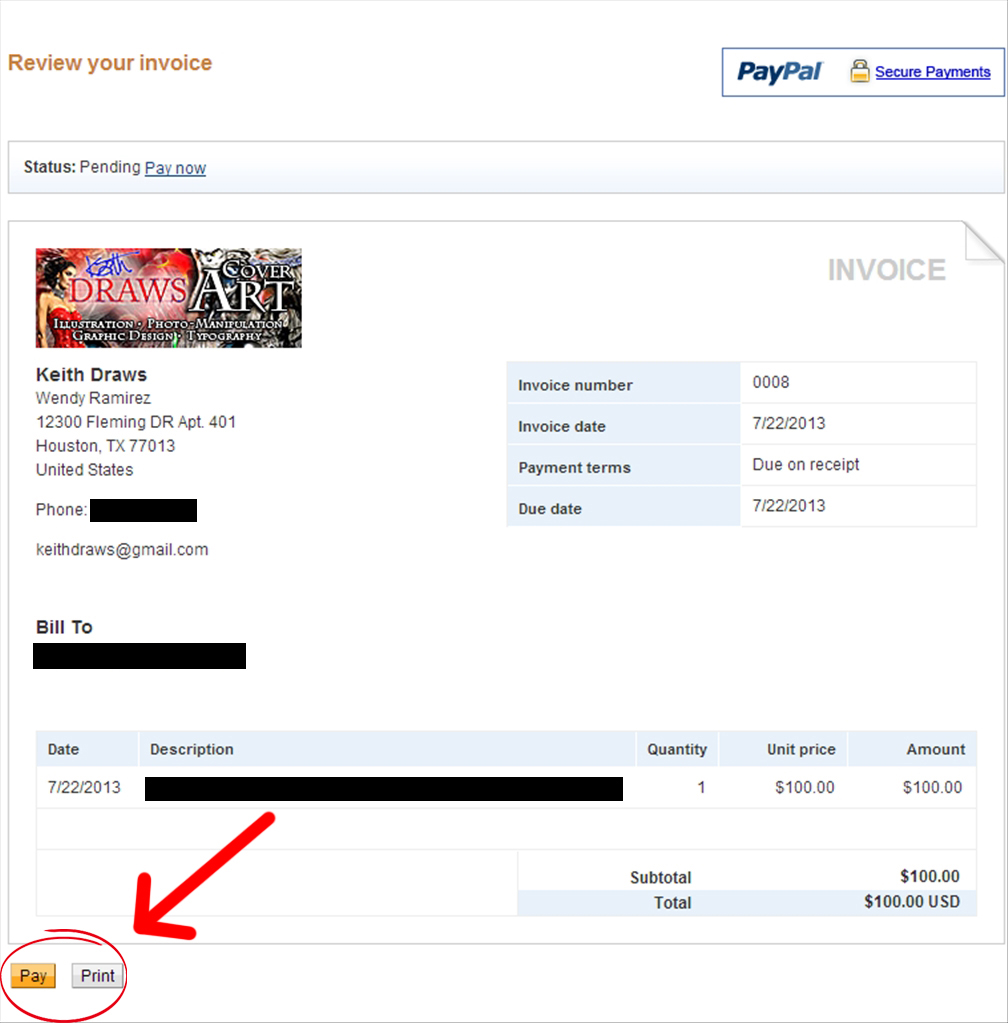
2.- Review the invoice and make sure all the information is correct. Next, click “Pay”.

ScreenShot020

3.- When redirected to the payments page, you will have two choices: You can pay using your existing Paypal account by logging in to Paypal:

ScreenShot021 copy

Or you can choose to pay with your credit/debit card (Note: You don’t have to join Paypal to use your card).

ScreenShot021

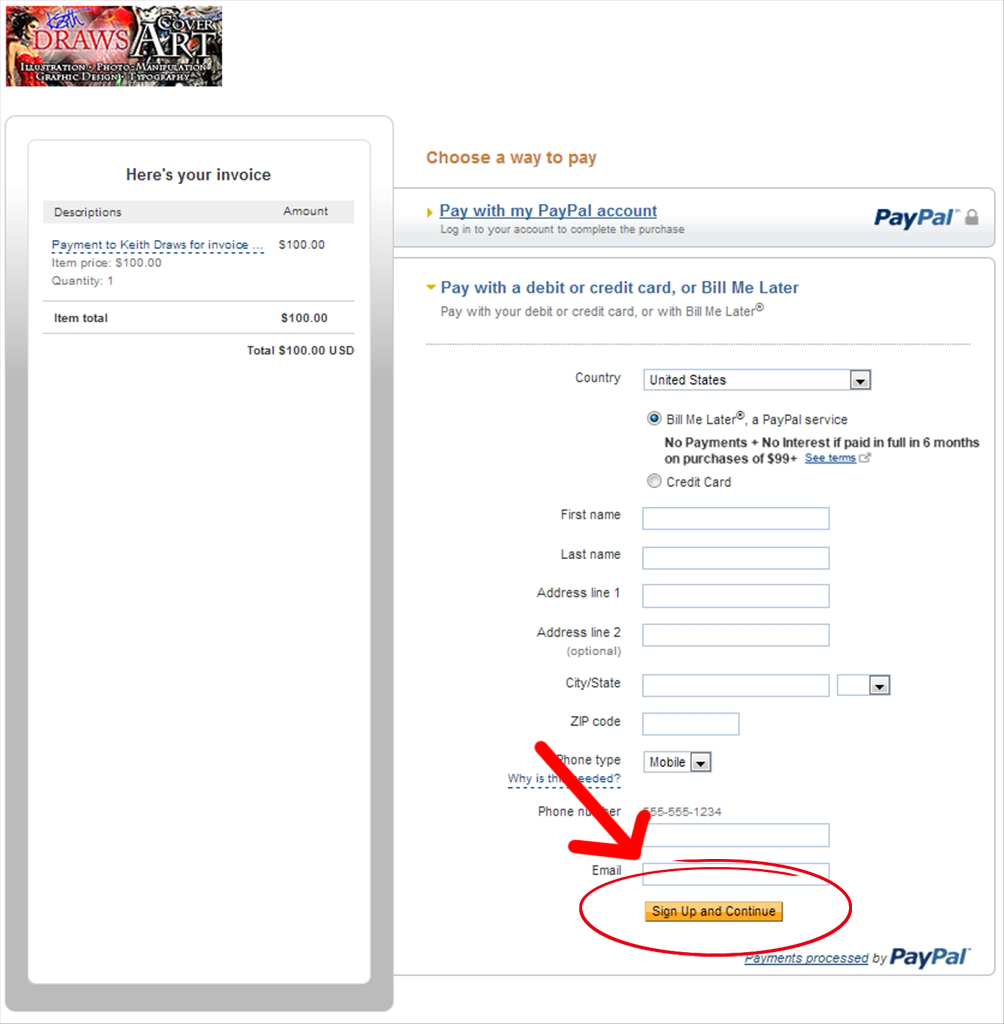
4.- Once you choose your preferred method of payment, click on the “Bill Me Later” button:

ScreenShot023 copy

Then click on “Sign Up and Continue”:

ScreenShot023

(Note: You don’t have to fill the form, just click directly.)

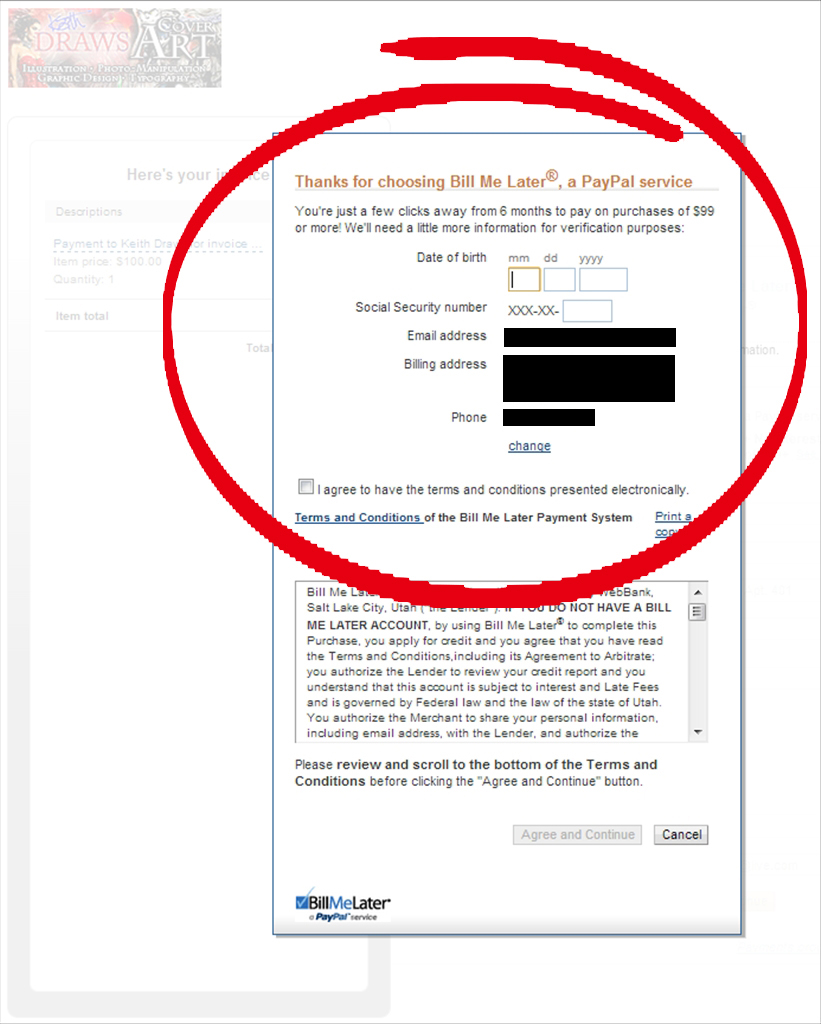
A screen will pop up with a different form. Fill in that form, click on “I agree to have the terms and conditions presented electronically”, then click on “Agree and Continue”.

ScreenShot024

After you complete the signup process, Paypal will take a few moments to verify your information and conduct a standard credit check. A pop-up message at the top of the page will let you know if you’ve been approved or denied. Once you’ve been approved you can complete your purchase and start enjoying the benefits of 6-month, interest free finance!

A Few Notes:

We strongly recommend you to read the Terms and Conditions, as they contain a lot of useful information regarding the service.

The service is currently available for U.S. Citizens only.

Paypal does not store your information (such as SSN), they only use it to conduct the credit check and dismiss it immediately.

For more information about the service, Click Here

E-Book cover sizes.

Tags

, , , , , , , , , , ,

I’ve noticed that finding the correct format for an e-book cover is not exactly easy. Even if you manage to find a guide on the publishing website you intend to use you soon find the documents are filled with jargon and useless information that serves only to confuse. So what I’ve done is break it down to the essential information. Please remember though that some of these formats are quite different from each other and I’d recommend you tweak your cover layout somewhat for each one. If I have missed any format out please let me know and I’ll add it. So in no particular order here is the only information you actually need:

Barnes and Noble (for Nook)

Aspect ratio:1.2

Image size: 600 pixels wide 730 pixels high.
DPI: 100
File size limit: 2 MB
Format: JPG (Maximum quality should not take the file size over the limit)

Kindle and Book Baby

Aspect ratio:1.6

Image size: 2820 x 4500 pixels (previously 1563 x 2500 pixels)
DPI: 72
File size limit: no limit specified
Format: JPG (Maximum quality should not take the file size over the limit)

Smash Words and Kobo

Aspect ratio:1.5

Image size: 1600 pixels wide x 2400 pixels high
DPI: 72
File size limit: 2MB
Format: JPG (Maximum quality should not take the file size over the limit)

LULU

Aspect ratio:1.3

Image size: 612 pixels wide x 792 pixels high
DPI: 72
File size limit: 2 million pixels
Format: JPG (Maximum quality should not take the file size over the limit)

Apple iBook

You need two covers for Apple.

1. Sales image:

Aspect ratio:1.6

Image size: 1563 pixels wide x 2500 pixels high.
DPI: 72
File size limit: none
Format: JPG (Maximum quality should not take the file size over the limit)

2. Internal cover (you can just reduce the sales image by 70% for this)

Aspect ratio:1.6

Image size: 1094 pixels wide x 1750 pixels high.
DPI: 72
File size limit: 2 million pixels
Format: JPG (Maximum quality should not take the file size over the limit)

If anybody finds anything to be incorrect please let me know in the comments. As far as I am aware these sizes are correct but it won’t hurt to double-check for yourself.

Of course, this may seem a bit daunting so it may be worth remembering that I only charge $15 per format to tweak your cover layout and provide a suitable file.

Creating Gold text.

Tags

, , , , , , , , , ,

This is  a simple way to make gold text in PS. The music is a bit distracting but the technique is good.


How to mask hair in PS5

Tags

, , , , , ,

This is a great video tutorial on creating a cut out mask for hair.

And this is even better: