Just wow!
Apparently my cover for “The Island” by Teri Hall is breathtaking.
See the actual post here

14 Tuesday Jan 2014
Posted in Composition, Photo compositing, Photoshop, The Rule of Thirds, Typography
Just wow!
Apparently my cover for “The Island” by Teri Hall is breathtaking.
See the actual post here
07 Saturday Dec 2013
Posted in Composition, General
30 Tuesday Apr 2013
Posted in Composition, E book sizes, General, Photoshop
Tags
Apple iBook, Barnes and Nobel, Book Baby, book cover, composition, Cover Art, Cover design, Keith Draws, kindle, Kobo, Lulu, Smash Words
I’ve noticed that finding the correct format for an e-book cover is not exactly easy. Even if you manage to find a guide on the publishing website you intend to use you soon find the documents are filled with jargon and useless information that serves only to confuse. So what I’ve done is break it down to the essential information. Please remember though that some of these formats are quite different from each other and I’d recommend you tweak your cover layout somewhat for each one. If I have missed any format out please let me know and I’ll add it. So in no particular order here is the only information you actually need:
Aspect ratio:1.2
Image size: 600 pixels wide 730 pixels high.
DPI: 100
File size limit: 2 MB
Format: JPG (Maximum quality should not take the file size over the limit)
Aspect ratio:1.6
Image size: 2820 x 4500 pixels (previously 1563 x 2500 pixels)
DPI: 72
File size limit: no limit specified
Format: JPG (Maximum quality should not take the file size over the limit)
Aspect ratio:1.5
Image size: 1600 pixels wide x 2400 pixels high
DPI: 72
File size limit: 2MB
Format: JPG (Maximum quality should not take the file size over the limit)
Aspect ratio:1.3
Image size: 612 pixels wide x 792 pixels high
DPI: 72
File size limit: 2 million pixels
Format: JPG (Maximum quality should not take the file size over the limit)
You need two covers for Apple.
1. Sales image:
Aspect ratio:1.6
Image size: 1563 pixels wide x 2500 pixels high.
DPI: 72
File size limit: none
Format: JPG (Maximum quality should not take the file size over the limit)
2. Internal cover (you can just reduce the sales image by 70% for this)
Aspect ratio:1.6
Image size: 1094 pixels wide x 1750 pixels high.
DPI: 72
File size limit: 2 million pixels
Format: JPG (Maximum quality should not take the file size over the limit)
If anybody finds anything to be incorrect please let me know in the comments. As far as I am aware these sizes are correct but it won’t hurt to double-check for yourself.
03 Wednesday Oct 2012
Posted in Composition, Photoshop, Typograpghy, Typography, Typography
11 Tuesday Sep 2012
Posted in Book Cover Design, Composition, golden ratio, The Rule of Thirds
Tags
book cover, composition, Cover Art, Cover design, design, golden ratio, illustration, Keith Draws, kindle, layout, Photo compositiing, The Rule of Thirds
I mentioned here that I’d show you how I apply the various compositional grids we’ve discussed so far on an actual cover design, so here it is. I don’t usually work with finished images but rather roughs, However I felt it would look better for this post.
Here I’m working with images I digitally painted , but you can work with Photos in the same way. In your photo editing software Paste two copies of any image you intend to scale, at full resolution into your art. Name one “Final Image ref no” and hide it, and name the other “rough ref no“. Now you can scale the “rough ref no” image up and down as much as you want because this is just your rough/design image. Once you have settled on the final size and position, use this as a template to scale and position the “Final Image ref no” layer and then hide the rough.
Pro Tip: When it comes to using the final image, remember if you scale it up more than 20% bigger than its original size the quality will be reduced to a point where its not usable. Scaling down is not a problem.
I decided to work with two grids. On the left is the Golden Ratio 9 section Grid, on the right you can see The Rule of Thirds, another 9 section grid.

So I fooled around for quite a while but finally I had six variations I was fairly happy with. Again “Golden Ratio” on the left, “Rule of Thirds” on the right.
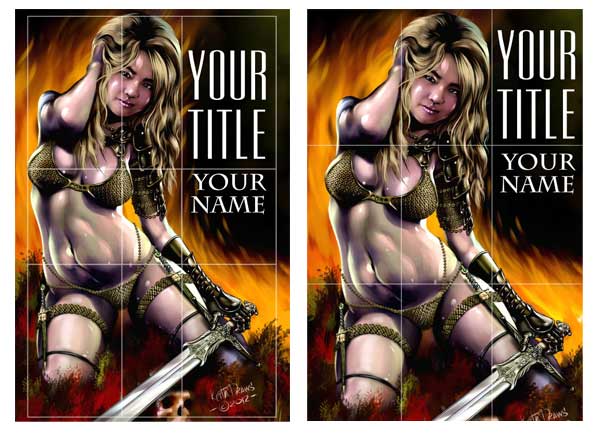
There may seem to be not a lot of difference here, but look at the placement. I’ve place the figure so she falls within the grid in a very specific way. On both versions she is occupying the left and central columns and the lowest horizontal dividing line bisects the hips just above, where her right leg flows into the right column. There are other subtle points of grid alignment that you can find if you study both images but they may differ in each image. The end result is that the figure in the Golden Ratio (on the left) is slightly smaller and is placed slightly higher. She fills just over half of the cover while in the image on the right she occupies almost 2 thirds of the cover.
At this point I also put some text in, its not going to be the final fonts but its giving me an idea of what properties the font will need and how well the title is going to work in this format. Notice the text falls higher on the page in the “Thirds” grid.
At this point I’m liking the “Golden Ratio ” more. So now its time to try further alternative:

I wondered if I could get “Book Title” across the top and so this was the result.
In Both cases I’m Filling the left vertical column and bisecting the central vertical column with the woman, leaving space at the top for the text. This was leaving a large blank space on the right that put everything out of visual balance so I placed a moon in there, bisected by the uppermost horizontal line and the furthest right vertical line. The flames are also helping to fill the grid in a balanced way.
In this case I prefer the result on the Right in the “Rule of Thirds” grid. Next I decided to try and make the text more dominant:
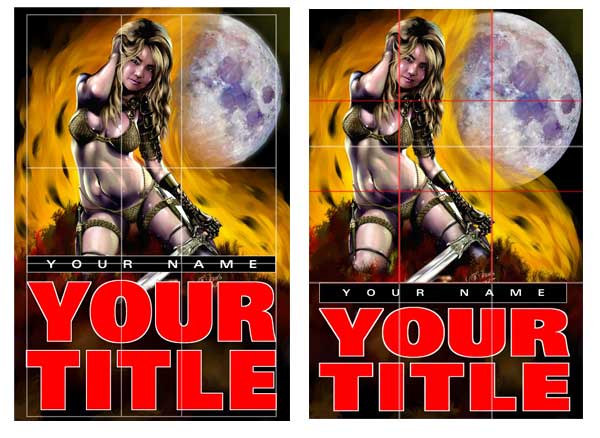
For me these two are too clearly divided up, but that may just be my personal bias. On the good side the title of the Book will be very clear indeed. In any case its worth studying how I’ve used the grids. Take special note of how, on the right, I have added a second grid (marked in red) within the upper two horizontal sections of the first.
By this point I now felt I had enough information to make an informed decision and decided I like the very first layout I did. So the next stage is to refine it some more. I’m going to discuss that in my next post since there are still quite a lot of issues to be considered.
Here again is the photoshop template for you to use. Its at the correct resolution for a 6 x 9 book including bleed with overlays for both of these grids. It’s 450 DPI at actual size and includes 3mm bleed. It also includes a template for the Kindle cover format which is 1.6 and slightly different to the 6×9 cover. Right click the link to save and and Download here:
10 Monday Sep 2012
Posted in Book Cover Design, color, Composition
Tags
Color theory is a complex subject, but over several posts, I’m going to try and break it down to what is important to you when designing covers.
Take a look at these interesting statistics:
Tests indicate that a black and white image may sustain interest for less than two-thirds a second, whereas a colored image may hold the attention for two seconds or more. (A product has one-twentieth of a second to halt the customer’s attention on a shelf or display.)
Source: Jill Morton, Colorcom
So basically using color you are getting 6 times as much attention from your potential reader than if you used a monotone image.
Ads in color are read up to 42% more often than the same ads in black and white (as shown in study on phone directory ads).
Source: White, Jan V., Color for Impact, Strathmoor Press, April, 1997
Now you are probably thinking: “but we are talking about a book cover not an ad, how is that possibly relevant?” Well if you think about it, a book cover is an advertisement for the book it appears on. And just like an ad, its going to sit among a lot of other images trying to grab your attention, Whether it’s on a shelf or in a virtual shelf such as the amazon bookstore.
Color can improve readership by 40 percent 1, learning from 55 to 78 percent 2, and comprehension by 73 percent3.
Sources:
(1)”Business Papers in Color. Just a Shade Better”, Modern Office Technology, July 1989, Vol. 34, No. 7, pp. 98-102
(2) Embry, David, “The Persuasive Properties of Color”, Marketing Communications, October 1984.
(3) Johnson, Virginia, “The Power of Color”, Successful Meetings, June 1992, Vol 41, No. 7, pp. 87, 90.
And though this bit of research was talking about Newspapers and Magazines I think its inclusion here is self explanatory. This is actually presenting a good case for including color in the body of your book too, and with e books this can be done at no extra cost. I’ll look into this in a later post.
Psychologists have documented that “living color” does more than appeal to the senses. It also boosts memory of the subject viewed.
Source: May 2002 issue of the Journal of Experimental Psychology: Learning, Memory and Cognition, published by the American Psychological Association (APA)
“The Contributions of Color to Recognition Memory for Natural Scenes,” Felix A. Wichmann, Max-Planck Institut für Biologische Kybernetik and Oxford University; Lindsay T. Sharpe, Universität Tübingen and University of Newcastle; and Karl R. Gegenfurtner, Max-Plank Institut für Biologische Kybernetik and Justus-Liebig-Universität Giessen; Journal of Experimental Psychology – Learning, Memory and Cognition, Vol 28. No.3., 5-May-2002
You want people to remember your book? Well that’s more likely to happen if you have a color cover.
92% Believe color presents an image of impressive quality
90% Feel color can assist in attracting new customers
90% Believe customers remember presentations and documents better when color is used
83% Believe color makes them appear more successful
81% Think color gives them a competitive edge
76% Believe that the use of color makes their business appear larger to clients
Source: Conducted by Xerox Corporation and International Communications Research from February 19, 2003 to March 7, 2003, margin of error of +/- 3.1%.
Again this information speaks for its self.
Vision is the primary source for all our experiences. (Current marketing research has reported that approximately 80% of what we assimilate through the senses, is visual.)
Source: Jill Morton, Colorcom
This means if we don’t use color on the cover we reducing the chances of visual assimilation by 80%.
So basically if you were thinking of using sepia tone, de-saturated images or any other monotone format on your cover I think its safe to say it might be worth re thinking that idea.
08 Saturday Sep 2012
Posted in Book Cover Design, Composition, golden ratio, The Rule of Thirds
Tags
book cover, cd cover, composition, Cover Art, Cover design, design, golden ratio, Keith Draws, kindle
This is a very simple template that can enhance your layout substantially.
It can be used on any format and it can also be broken down into further thirds sections, but more of that later. First lets look at the template when applied to a standard 6 x 9 book cover.
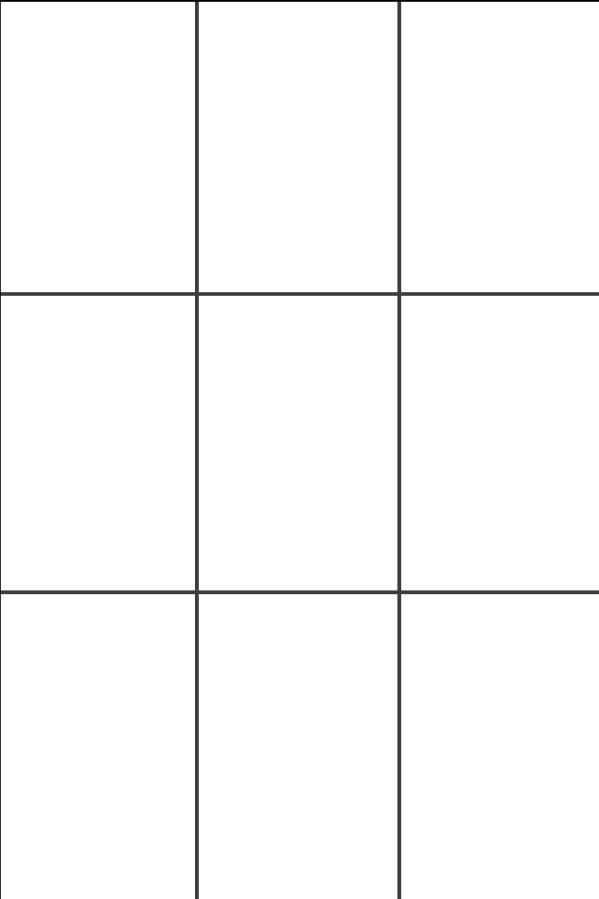
Standard 6×9 book, “thirds” grid.
The rule of thirds was first written down by John Thomas Smith in 1797. In his book Remarks on Rural Scenery, Smith quotes a 1783 work by Sir Joshua Reynolds, in which Reynolds discusses, in unquantified terms, the balance of dark and light in a painting. Smith then continues with an expansion on the idea, naming it the ‘Rule of thirds’:
Two distinct, equal lights, should never appear in the same picture: One should be principal, and the rest sub-ordinate, both in dimension and degree: Unequal parts and gradations lead the attention easily from part to part, while parts of equal appearance hold it awkwardly suspended, as if unable to determine which of those parts is to be considered as the subordinate. “And to give the utmost force and solidity to your work, some part of the picture should be as light, and some as dark as possible: These two extremes are then to be harmonized and reconciled to each other. (Reynolds’ Annot. On Du Fresnoy.)
Analogous to this “Rule of thirds”, (if I may be allowed so to call it) I have presumed to think that, in connecting or in breaking the various lines of a picture, it would likewise be a good rule to do it, in general, by a similar scheme of proportion; for example, in a design of landscape, to determine the sky at about two-thirds ; or else at about one-third, so that the material objects might occupy the other two : Again, two thirds of one element, (as of water) to one third of another element (as of land); and then both together to make but one third of the picture, of which the two other thirds should go for the sky and aerial perspectives. This rule would likewise apply in breaking a length of wall, or any other too great continuation of line that it may be found necessary to break by crossing or hiding it with some other object : In short, in applying this invention, generally speaking, or to any other case, whether of light, shade, form, or color, I have found the ratio of about two thirds to one third, or of one to two, a much better and more harmonizing proportion, than the precise formal half, the two-far-extending four fifths and, in short, than any other proportion whatever. I should think myself honored by the opinion of any gentleman on this point; but until I shall by better informed, shall conclude this general proportion of two and one to be the most pictoresque medium in all cases of breaking or otherwise qualifying straight lines and masses and groupes , as is agreed to be the most beautiful, (or, in other words, the most pictoresque) medium of curves
Source: http://en.wikipedia.org/wiki/Rule_of_thirds
Basically what he’s saying is only have one center of focus and everything else in the image should serve to complement it and guide the eye toward it. Using this grid should help an artist (you in this case) balance the image. I’ll talk about color and contrast in more detail in a later post.
That’s easily said, even using this grid to create a balanced and pleasing image is not always as easy as it sounds so its always worth experimenting with it.
I’ve created some simple layouts guides to help you in some small way, I recommend you experiment further:
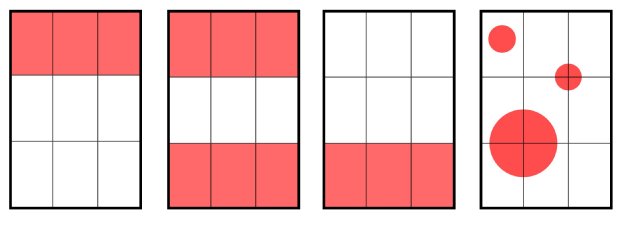
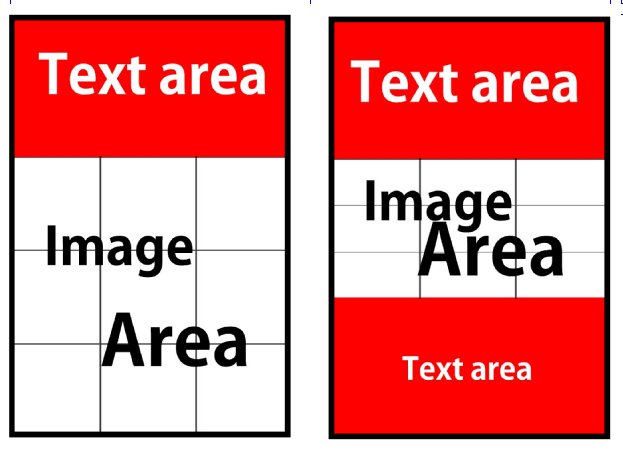
Remember earlier when I said: “ it can also be broken down into further thirds sections”
Here are a couple of examples of that:
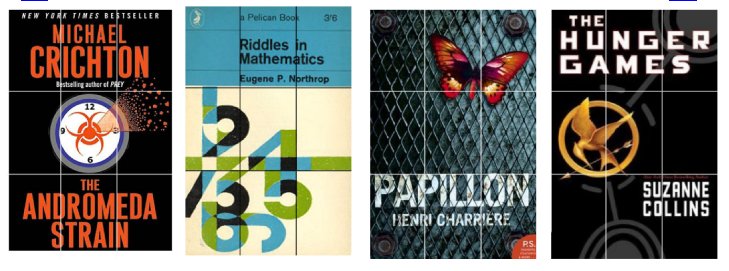
 And now here are a few examples of actual books with the rule of thirds applied on the cover:
It’s also possible to adapt the Golden Ratio into a 9 section grid for your cover. You simply take four Golden rectangles and overlay them as shown below:
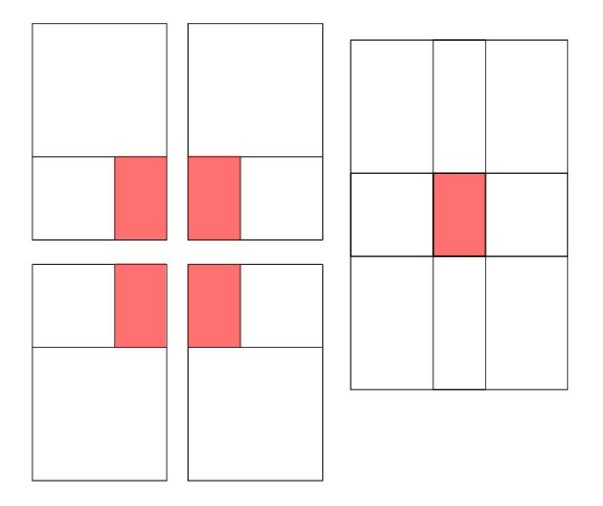 I actually prefer it to the standard “Rule of Thirds” and I’m working on a cover using this format right now, so I’ll post it as soon as its done showing you some of the design decisions I was faced with when I produced it. I’ll talk about color and contrast in more detail in a later post.
Finally, I’m giving you a photoshop template at the correct resolution for a 6 x 9 book including bleed with overlays for both of these grids. It’s 450 DPI at actual size and includes 3mm bleed. It also includes a template for the Kindle cover format which is 1.6 and slightly different to the 6×9 cover. Right-click the link to save and Download here:
Okay, I think that’s it for now, I hope this is helpful to you.
02 Sunday Sep 2012
Posted in Book Cover Design, golden ratio, Typography
Tags
book cover, cd cover, composition, Cover Art, design, golden ratio, illustration, kindle, layout, typography
There is a lot of mystical talk about the Golden Ratio:
The Golden Ratio is also known as the Golden Mean, Phi, or Divine Proportion, this law was made famous by Leonardo Fibonacci around 1200 A.D. He noticed that there was an absolute ratio that appears often throughout nature, a sort of design that is universally efficient in living things and pleasing to the human eye. Hence, the “divine proportion” nickname.
source: digital-photography-school.com

But we are not really concerned with all the mysticism and math here: We are simply concerned with how to make a good cover design. So how does it concern us? Well if you divide the imagery up on your cover using this method you end up with a very pleasing and well balanced image.
The Grid looks like this:

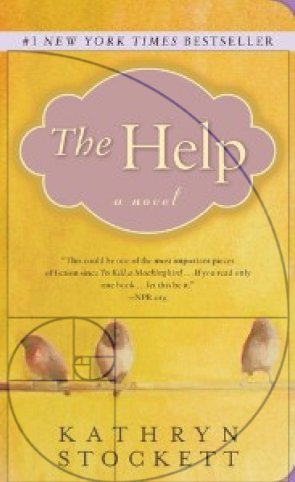 And If you want some evidence of just how well it works:
The cover for “The Help” by Kathryn Stockett looks like it was designed using this principle and according to USA today it was the number one selling book of 2011. Of course, that may have a little to do with the writing as well, but that cover really did grab the attention of potential readers.
A golden rectangle can be drawn out using a straightedge and a compass like this (see below):
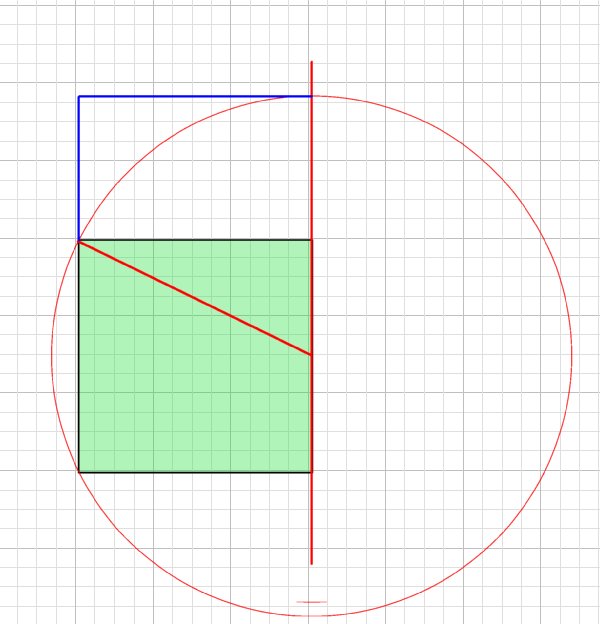
You can use the grid anyway round you like, horizontally, vertically, flipped and even in multiples at angles as it is seen in the sunflower. Of course, I recommend keeping things simple, it’s less risky.
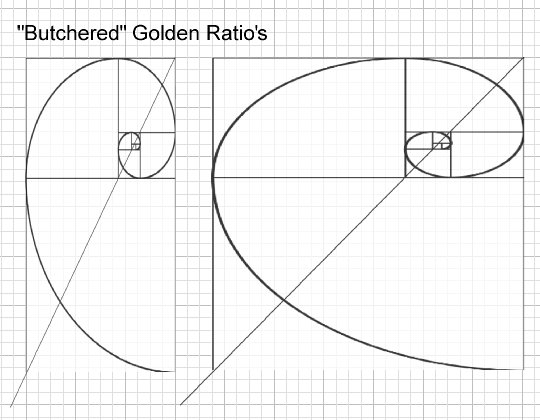
The next thing to consider is the proportions of your cover. A paperback book cover, though close, is not quite of the same proportions as the Golden Rectangle. But this doesn’t mean you can’t use it. In the diagram below the green area represents a standard Kindle book cover, and I’ve shown two possible alternative uses of the format. One is scaled down proportionally (as on the cover of “The Help”) and another is scaled vertically in order to use all the books space, this I will call a “Butchered” Golden Rectangle. It still leads to good quality composition, but it’s not quite as aesthetically pleasing.
The same thing applies to CD covers, though the square format is very different making things slightly more problematic as can be seen in the diagrams below.

If you are wondering why this particular compositional model is so appealing, well there are many theories, but nothing is confirmed. Personally, I think its got a lot to do with the subconscious human skill of detecting patterns, and the more perfect the pattern the more we like it.
That said, imperfect patterns such as a “Butchered” Golden Ratio still appeal because they do have internal consistency and a detectable pattern.
Here you can see how I’ve used the Golden Ratio on a recent book cover. I kept it in proportion matching the width of the book but allowing it to bleed just a little above and below the page. Look at the key elements of the cover. The typography; and how the focus is drawn into the word “Rebirth” The way the eye is bisected between the first square and second golden rectangle, the way the beard, nose, and brow follow the curve of the spiral. The way the front edge of the base of the ear bisects the central square, and so on. I’m sure you can spot much more.

Its also possible to use the Golden ratio in your Typography (i.e. with your fonts and text layout) not only on the cover but actually in your book and there is a great blog piece by Chris Pearson about just that right here: http://www.pearsonified.com/2011/12/golden-ratio-typography.php
I’m going to continue to explore all the other compositional grids, methods and techniques in future posts and with a bit of luck by the end of it all we will all be better cover designers.
If you enjoyed this article and perhaps found some help in here I’d appreciate a Facebook “share” and or “like” and one in as many other social networks as you can bring yourself to click on.
And finally back to the mysticism.
01 Saturday Sep 2012
Posted in Book Cover Design, Composition
Tags
Everything I’m saying here refers to covers for Books CD’s, DVD’s and anything else you can think of, So I’m just going to refer to your product as a “Book” though the advice will apply to any product.
You can’t judge a book by it’s cover.
Well so the old saying goes, but in fact unless you are well known, then that’s exactly what is going to happen. The cover is the first thing a person will see when looking at your book. In fact it is the first contact you will have with your potential audience and so you really want to capture their interest. This is a time when first impressions really do count, in fact it could be life or death for your work.
This may sound strange but basically when combined with the title it has to be a “lead in” with a “cliffhanger ending”. Or to put it another way, it has to basically indicate whats inside in a way that leaves the viewer longing to know and experience more.
Here are a couple of examples:
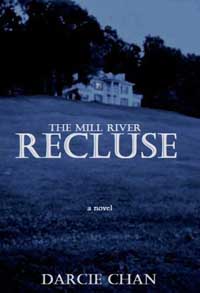

Looking at the cover of “The Mill River Recluse” makes you start to wonder who he or she is, do they live in that strange isolated house, where is it?. and so on. It’s working.
As for “Steve Jobs” it may not look as if its following that formula but in fact, it is a very well chosen photo of the man. He looks friendly, smart, interesting and approachable leading the viewer to think that opening this book will let them into the life of a truly fascinating man.
So both those covers leave the viewer wanting more, and that’s what we all want to achieve isn’t it?
In future posts I’m going to explore how to go about achieving this in much more detail; but for now why not take a look at some covers around you and try and determine how well they are doing this.
 keithdraws